
Finding the right software to sign documents shouldn’t take longer than the actual signing process. In 2026, businesses need tools that offer predictable costs, robust security, and seamless workflows.
- Best value for SMBs: airSlate SignNow delivers enterprise-grade features with unlimited users on paid plans, making it a top choice for growing teams.
- Free options: Zoho Sign and Dropbox Sign offer the most generous free allowances for occasional users who need an app to sign documents without a subscription.
- Enterprise needs: Adobe Acrobat and DocuSign remain strong contenders for complex, highly regulated workflows, though costs can fluctuate based on volume.
- Compliance matters: All listed apps support U.S. ESIGN Act compliance, but identity assurance requirements are evolving with new NIST guidelines.
- Identity assurance: Look for apps that support modern verification methods like KBA and ID checks if you handle high-risk contracts.
The shortlist (why these seven)
- airSlate SignNow — Value leader for SMBs & mid-market; transparent, unlimited users on paid plans; solid automation.
- DocuSign — Market standard with vast integrations; envelope-based plans fit contractual workflows.
- Adobe Acrobat + Acrobat Sign — Deep PDF stack, AI assistant, strong enterprise/security posture.
- Dropbox Sign — Friendly UX tied to Dropbox; Free plan with 3 requests/month.
- Zoho Sign — Free plan with 5 envelopes/month; aggressive feature expansion via credits.
- SignWell — Free plan and low-cost tiers, straightforward e-sign with unlimited docs on paid plans.
- Smallpdf + Sign.com — PDF toolkit with Sign.com built-in; Free limits exist for light use.
Introduction
Choosing an electronic signature app isn’t just about putting a name on a dotted line. It is about creating a secure, legally binding record that protects your business. In 2026, the market is crowded with options, ranging from simple free tools to complex enterprise platforms.
For small and medium-sized businesses (SMBs), the challenge often lies in balancing features with cost. Many providers charge based on the number of “envelopes” or documents you send. This model can make budgeting difficult if your volume spikes unexpectedly.
This guide compares seven leading solutions to help you find the best electronic signature app for your specific needs. We focus on transparency, usability, and U.S. market trends. Whether you need a free tool for a one-off contract or a scalable solution for a sales team, you will find clear answers here.
Why electronic signatures matter in 2026
The legal foundation for electronic signatures in the United States is well-settled. The federal ESIGN Act and state UETA laws grant electronic signatures the same legal status as wet-ink signatures. However, simply having a digital image of a signature is not enough for every scenario.
In 2026, identity assurance is a critical factor. Updated guidelines, such as NIST SP 800-63-4, emphasize the importance of verifying who is actually behind the keyboard. This is especially true for high-value transactions or regulated industries like healthcare and finance.
A robust eSignature app provides more than just a signature field. It creates a detailed audit trail. This log records who signed, when they signed, and the IP address they used. This data is essential for proving the validity of a document if it is ever challenged in court.
Best eSignature apps to close deals faster
We evaluated these platforms based on pricing transparency, ease of use, and feature depth. Here is how the top contenders stack up.
1. SignNow
Best for: SMBs and mid-market teams seeking value and scalability.
airSlate SignNow stands out by offering a unique combination of rich features and transparent pricing. Unlike many competitors that charge per envelope, SignNow typically allows unlimited users on its paid plans. This approach provides predictable costs for growing businesses.
Users get access to advanced tools like bulk sending, payment collection, and conditional fields without needing an enterprise-level budget. The interface is intuitive, allowing teams to set up workflows in minutes. For businesses that need a reliable app to sign documents securely, SignNow offers a high return on investment.
Key features:
- Unlimited users on paid plans (check specific tier details).
- Mobile-first design for signing on the go.
- Strong API for custom integrations.
- 24/7 support availability.
2. DocuSign
Best for: Enterprises needing deep ecosystem integrations.
DocuSign connects seamlessly with hundreds of other business tools. However, its pricing model is often based on envelopes. This means you pay for usage units, which can become costly for high-volume senders.
It is a powerful tool for complex contract lifecycles. If your business relies heavily on a specific CRM or ERP that only integrates with DocuSign, it might be the right choice. Just be sure to forecast your document volume accurately to avoid overage fees.
Key features:
- Extensive integration marketplace.
- Advanced contract lifecycle management (CLM) options.
- Industry-standard reputation.
3. Adobe Acrobat + Acrobat Sign
Best for: Heavy PDF workflows and regulated enterprises.
If your team lives in PDFs, Adobe is a natural fit. Acrobat Sign is deeply integrated into the Adobe ecosystem. It offers powerful editing tools alongside eSignature capabilities.
Recent updates have introduced AI assistants that help summarize contracts and extract clauses. This is excellent for legal teams reviewing long agreements. However, pricing is often tied to Acrobat business licenses, which can be expensive for teams that only need signing capabilities.
Key features:
- Native PDF editing and creation.
- AI-powered document assistance.
- Global compliance certifications.
4. Dropbox Sign (formerly HelloSign)
Best for: Teams already using Dropbox for file storage.
Dropbox Sign prioritizes simplicity. It offers a very clean user experience that integrates directly into Dropbox storage. For users who already store their contracts in the cloud, this seamless connection saves time.
The free plan allows for 3 signature requests per month. This is a decent option for freelancers or very small businesses. It lacks some of the deeper automation features found in SignNow or DocuSign, but excels at basic tasks.
Key features:
- Seamless Dropbox integration.
- User-friendly interface.
- Free tier for light use.
5. Zoho Sign
Best for: Free usage and Zoho ecosystem users.
Zoho Sign offers one of the most generous free plans on the market, allowing up to 5 envelopes per month. For improved functionality, paid tiers use a credit system for advanced actions like SMS authentication.
This platform is ideal if you already use other Zoho products like Zoho CRM or Zoho Books. It integrates tightly within that suite, allowing data to flow easily between apps.
Key features:
- Generous free plan (5 envelopes/month).
- Deep integration with Zoho suite.
- Blockchain timestamping options.
6. SignWell
Best for: Simple, affordable signing for individuals.
SignWell focuses on being a straightforward e-signature app without unnecessary complexity. It offers a free plan with 3 documents per month. Its paid plans are cost-effective and often include unlimited documents.
The user experience is stripped down to the essentials. It guides senders and signers through the process quickly. While it may lack advanced enterprise controls, it is a strong contender for solo entrepreneurs.
Key features:
- Simple, intuitive UI.
- Document templates included in paid plans.
- Audit reports for all documents.
7. Smallpdf + Sign.com
Best for: Occasional signing within a PDF toolset.
Smallpdf is primarily a PDF manipulation tool (compress, convert, merge) that includes signing functionality powered by Sign.com. The free version allows for 2 documents per day or month, depending on the current offer limits.
This is a great app to sign documents if your primary need is editing PDFs and you only sign occasionally. It is less suited for teams that need complex routing or bulk-sending workflows.
Key features:
- Comprehensive PDF tools (merge, split, compress).
- Browser-based with no installation required.
- Quick signing for simple documents.
Comparison: Free allowances & value
Comparing apps to sign documents can be confusing because vendors use different billing units. Some charge by the user, while others charge by the “envelope” (a container for documents).
| App | Free Allowance (Per Month) | Primary Billing Model | Notable Value |
| SignNow | Free Trial Only | Per User (Tiered) | Unlimited users on paid plans; transparent pricing. |
| Zoho Sign | 5 Envelopes | Per User + Credits | Best free allowance for very light use. |
| Dropbox Sign | 3 Requests | Per User | Seamless file storage integration. |
| SignWell | 3 Documents | Per Sender | Simple “unlimited documents” on paid tiers. |
| DocuSign | Trial Only | Envelope-Based | Industry standard for integrations. |
| Adobe Acrobat | Trial Only | Per License | Best for heavy PDF editing needs. |
| Smallpdf | 2 Documents | Subscription | Bundled with PDF manipulation tools. |
Note: “Envelope” usually means one send, which can contain multiple documents and recipients. Always check the current vendor terms as allowances change.
Choosing the right app for your needs
Selecting the best electronic signature app depends on your business volume and compliance requirements.
For SMBs and growing teams
Small businesses need predictability. You do not want a bill that doubles just because you had a busy sales month.
Recommendation: airSlate SignNow is often the superior choice here. The ability to have unlimited users on paid plans allows your team to grow without friction. You get enterprise-grade features like bulk sending and mobile apps at a price point designed for SMBs.
For regulated enterprises
If you work in healthcare (HIPAA) or life sciences (21 CFR Part 11), compliance is your top priority. You need granular audit trails and identity verification.
Recommendation: Adobe Acrobat Sign and DocuSign have deep pedigrees here. However, SignNow also offers robust compliance features, including HIPAA compliance on specific enterprise tiers, often at a more competitive rate.
For freelancers and solo users
If you only sign a few contracts a month, a free plan is likely sufficient.
Recommendation: Zoho Sign or SignWell. Both provide enough free volume to handle occasional freelance contracts or consulting agreements without forcing a subscription.
Legally-binding eSignature: Security and compliance in 2026
Security is the backbone of any electronic signature app. In 2026, valid eSignatures in the U.S. rely on adherence to the ESIGN Act and UETA.
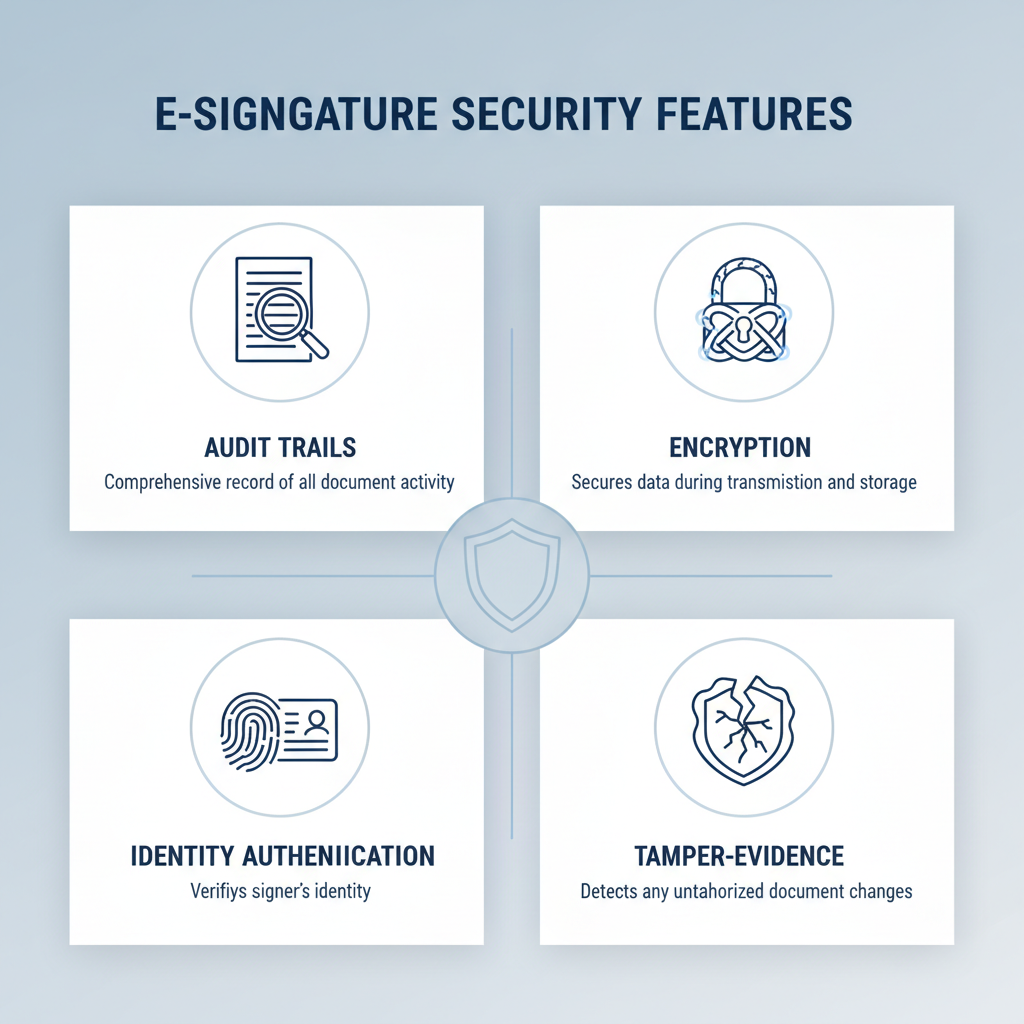
Key security features to look for:
- Audit trails: Every document should have a detailed history log, proving who signed and when. Audit trails help ensure documents are enforceable and actions are clearly documented.
- Encryption: Documents should be encrypted both in transit and at rest. To protect your data, reputable apps for signing documents like SignNow use advanced encryption (AES-256). SignNow’s security overview details these protections.
- Identity authentication: Basic email authentication is standard. Leading providers offer SMS validation, Knowledge-Based Authentication (KBA), or government ID checks for higher assurance, aligning with standards such as NIST SP 800-63-4.
- Tamper-evidence: Any alteration to a signed document should render the signature invalid. SignNow and comparable providers use digital certificates and tamper-evident seals that comply with industry standards.
Robust electronic signature solutions prioritize security, compliance, and integrity. They incorporate advanced features such as user authentication, tamper-evidence mechanisms, and adherence to recognized standards to ensure the validity and reliability of signed documents. These measures collectively safeguard sensitive information and provide confidence in the digital signing process.
Final thoughts
The market for electronic signatures in 2026 offers a solution for every business size. For freelancers, free tiers from Zoho or SignWell keep costs to zero. For massive enterprises with complex PDF needs, Adobe remains a powerhouse.
However, for the vast middle ground—SMBs and mid-market companies seeking growth—SignNow delivers the best balance. It avoids the “envelope anxiety” of metered pricing while providing the robust security and features modern businesses demand. SignNow is fully compliant with industry standards, including the ESIGN Act, UETA, and evolving NIST digital identity guidelines, ensuring your electronic signatures are legally enforceable and secure.
By choosing a transparent, scalable partner, you ensure your workflow supports your growth rather than limiting it.
Ready to streamline your document workflow with predictable pricing and unlimited users? Start your free trial of SignNow today.
Disclaimer: This article provides general information about electronic signature software and laws as of early 2026. It does not constitute legal advice. Laws and regulations vary by jurisdiction and are subject to change. Please consult with legal counsel for specific compliance questions.
Glossary
- Envelope: A digital container used in e-signature apps that holds one or more documents to be sent to one or more recipients for signing.
- Audit trail: A detailed, chronological record that logs every action taken on a document, including viewing, signing, and declining, to ensure legal enforceability.
- ESIGN Act: The Electronic Signatures in Global and National Commerce Act, a U.S. federal law that gives electronic signatures the same legal validity as handwritten signatures.
- KBA (Knowledge-Based Authentication): A security method that verifies a signer’s identity by asking them personal questions based on public data records, like “Which of these addresses have you lived at?”
- UETA (Uniform Electronic Transactions Act): A state-level act adopted by most U.S. states that harmonizes rules for electronic retention of records and validity of electronic signatures.
FAQ
Are electronic signatures legally binding in the U.S.?
Yes, electronic signatures are legally binding in the United States. The federal ESIGN Act and state UETA laws established this over two decades ago. As long as you obtain consent from the signer and maintain a secure record, the signature is enforceable in court.
What is the difference between a digital signature and an electronic signature?
An electronic signature is a broad term for any electronic process that indicates acceptance of an agreement. A digital signature is a specific, highly secure type of electronic signature that uses encryption technology to verify the authenticity of the document. Most commercial apps to sign documents use digital signature technology under the hood to secure the file.
Do recipients need an account to sign a document?
In most cases, no. Leading platforms like SignNow allow you to send a document to anyone with an email address. The recipient clicks a link to open and sign the document without needing to pay or create a login.
Can I sign documents on my phone?
Yes, modern e-signature solutions are mobile-responsive. Apps like SignNow have dedicated mobile applications for iOS and Android. This allows you to sign contracts, approve workflows, and track document status directly from your smartphone or tablet.
Is it safe to use free electronic signature apps?
Reputable providers with free tiers, like Zoho Sign or Dropbox Sign, are generally safe and use standard encryption. However, avoid using unknown or unverified tools for sensitive data. Always check if the vendor complies with security standards like SOC 2 or ISO 27001 before uploading private contracts.
How does pricing per envelope work?
In an envelope-based model, you purchase a set number of “sends” per year. If you send one contract to three people, that counts as one envelope. If you run out of envelopes, you must buy more, often at a higher rate. This is why user-based pricing (like SignNow’s model) is often preferred for high-volume teams.
What happens if a signer denies the electronic signature?
If a signer claims they did not sign a document, the audit trail becomes your primary defense. The e signature app provides a log showing the IP address, email, and timestamp of the signature. This technical evidence makes it very difficult for a signer to falsely deny their involvement.
- Introduction
- Why electronic signatures matter in 2026
- Best eSignature apps to close deals faster
- 1. SignNow
- 2. DocuSign
- 3. Adobe Acrobat + Acrobat Sign
- 4. Dropbox Sign (formerly HelloSign)
- 5. Zoho Sign
- 6. SignWell
- 7. Smallpdf + Sign.com
- Comparison: Free allowances & value
- Choosing the right app for your needs
- Legally-binding eSignature: Security and compliance in 2026
- Final thoughts
- Glossary
- FAQ